Complete Guide to JSON: Format, Validate, and Transform Your Data
Everything you need to know about JSON -- from basic syntax to advanced formatting techniques. Learn how to format, validate, convert, and troubleshoot JSON data like a professional developer.
What is JSON and Why Does It Matter?
JSON (JavaScript Object Notation) is a lightweight data interchange format that has become the de facto standard for transmitting data between servers and web applications. Created by Douglas Crockford in the early 2000s, JSON was designed to be easy for humans to read and write, and easy for machines to parse and generate.
Today, JSON is everywhere. REST APIs use it for request and response bodies. Configuration files in tools like package.json, tsconfig.json, and .eslintrc.json rely on it. Databases like MongoDB store documents in JSON-like formats. Even inter-service communication in microservice architectures predominantly uses JSON.
Understanding JSON is not optional for modern developers -- it is a fundamental skill. Whether you are a frontend developer consuming API data, a backend engineer designing APIs, or a DevOps engineer managing configuration files, you work with JSON every single day.
JSON Syntax: The Complete Rules
JSON syntax is deceptively simple, but getting the details wrong leads to parsing errors that can be difficult to debug. Here are the complete rules:
Data Types
JSON supports exactly six data types:
- String: Text enclosed in double quotes. Example:
"hello world" - Number: Integer or floating-point. Example:
42,3.14,-7,1.5e10 - Boolean: Either
trueorfalse(lowercase only) - Null: The value
null(lowercase only) - Object: An unordered collection of key-value pairs enclosed in curly braces
{} - Array: An ordered list of values enclosed in square brackets
[]
Key Syntax Rules
- All keys must be strings enclosed in double quotes (single quotes are not allowed)
- Key-value pairs are separated by colons (
:) - Multiple pairs or values are separated by commas (
,) - No trailing commas are allowed after the last item
- No comments are allowed (unlike JavaScript)
- The root element must be either an object
{}or an array[]
Valid JSON Example
{
    "name": "John Doe",
    "age": 30,
    "isActive": true,
    "email": null,
    "address": {
        "street": "123 Main St",
        "city": "New York",
        "zipCode": "10001"
    },
    "skills": ["JavaScript", "Python", "SQL"],
    "projects": [
        {
            "name": "Website Redesign",
            "status": "completed",
            "year": 2025
        },
        {
            "name": "API Migration",
            "status": "in-progress",
            "year": 2026
        }
    ]
}
The 10 Most Common JSON Errors (and How to Fix Them)
Even experienced developers make these mistakes. Here are the most frequent JSON syntax errors and their solutions:
1. Trailing Commas
This is the single most common JSON error. JavaScript allows trailing commas, but JSON does not.
// WRONG - trailing comma after "SQL"
{
    "skills": ["JavaScript", "Python", "SQL",]
}

// CORRECT
{
    "skills": ["JavaScript", "Python", "SQL"]
}
2. Single Quotes Instead of Double Quotes
JSON requires double quotes for all strings and keys. Single quotes or backticks will cause a parse error.
// WRONG
{'name': 'John'}

// CORRECT
{"name": "John"}
3. Unquoted Keys
Unlike JavaScript objects, JSON keys must always be quoted strings.
// WRONG
{name: "John", age: 30}

// CORRECT
{"name": "John", "age": 30}
4. Using Undefined or NaN
JSON does not support undefined, NaN, or Infinity. Use null instead.
5. Comments in JSON
JSON does not support comments. If you need comments in configuration files, consider using JSONC (JSON with Comments) or YAML instead.
6. Missing Commas Between Items
// WRONG - missing comma between "age" and "city"
{"name": "John" "age": 30}

// CORRECT
{"name": "John", "age": 30}
7. Unescaped Special Characters in Strings
Characters like backslashes, double quotes, newlines, and tabs inside strings must be escaped.
// WRONG
{"path": "C:\Users\file.txt"}

// CORRECT
{"path": "C:\Users\file.txt"}
8. Using Hexadecimal Numbers
JSON only supports decimal numbers. Hex values like 0xFF are invalid.
9. Leading Zeros in Numbers
Numbers like 007 or 01 are invalid in JSON. Use 7 or 1 instead.
10. Incorrect Boolean/Null Casing
Booleans and null must be lowercase: true, false, null. Values like True, FALSE, or NULL are invalid.
The fastest way to catch these errors? Paste your JSON into our JSON Formatter & Validator -- it will highlight the exact line and character where the error occurs.
JSON Formatting Best Practices
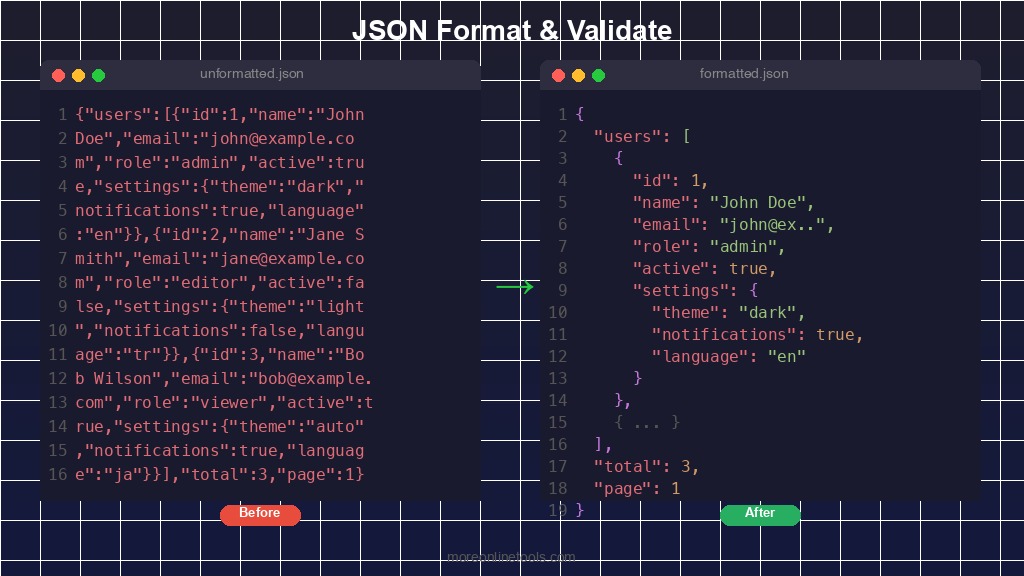
Well-formatted JSON is not just about aesthetics -- it directly impacts readability, debugging speed, and collaboration quality.
Indentation
Use consistent indentation throughout your JSON. The two most common styles are:
- 2 spaces: Popular in JavaScript/Node.js ecosystems (Google style guide)
- 4 spaces: Popular in Python ecosystems and many corporate standards
- Tabs: Less common but preferred by some developers for accessibility
In JavaScript, you can format JSON with your preferred indentation using JSON.stringify(data, null, 2) where the third argument is the number of spaces.
Key Naming Conventions
- camelCase:
"firstName"-- most popular in JavaScript APIs - snake_case:
"first_name"-- common in Python and Ruby APIs - kebab-case:
"first-name"-- less common, used in some REST APIs
The most important rule is consistency. Pick one convention and stick with it throughout your entire API or configuration.
Minified vs. Pretty-Printed
Use minified JSON (no whitespace) for production APIs and data transfer to minimize bandwidth. Use pretty-printed JSON (with indentation) for configuration files, documentation, debugging, and logging.
JSON vs. XML vs. YAML: When to Use What
JSON is not the only data format. Here is how it compares to the alternatives:
| Feature | JSON | XML | YAML |
|---|---|---|---|
| Readability | Good | Moderate (verbose) | Excellent |
| File size | Small | Large (tag overhead) | Smallest |
| Comments | Not supported | Supported | Supported |
| Data types | 6 types | Text only (needs schema) | Rich (dates, etc.) |
| Schema validation | JSON Schema | XSD, DTD | Limited |
| Best for | APIs, config files | Documents, SOAP APIs | Config files, CI/CD |
Use JSON when: Building REST APIs, web applications, mobile apps, or any scenario where you need lightweight, fast data interchange.
Use XML when: Working with legacy systems, SOAP APIs, document formats (like SVG, RSS), or when you need rich schema validation.
Use YAML when: Writing configuration files (Docker Compose, Kubernetes, GitHub Actions), where human readability and comments are priorities.
Need to convert between these formats? Our tools make it easy: JSON to YAML, YAML to JSON, and XML Formatter are all available for free.
Working with JSON: Practical Conversions
JSON to CSV
When you need to analyze JSON data in a spreadsheet or import it into a database, converting JSON to CSV is essential. This is especially common when working with API data that you need to share with non-technical stakeholders.
Our JSON to CSV Converter handles nested objects, arrays, and complex data structures, flattening them into a tabular CSV format. It automatically detects column headers from your JSON keys and handles edge cases like missing fields and nested values.
CSV to JSON
The reverse operation -- converting CSV to JSON -- is equally important. When migrating data from spreadsheets to APIs or databases, the CSV to JSON Converter transforms your tabular data into properly structured JSON arrays.
JSON to YAML and Back
Switching between JSON and YAML is a daily task for DevOps engineers. Docker Compose files, Kubernetes manifests, and CI/CD pipelines use YAML, while APIs and application code use JSON. Our JSON to YAML and YAML to JSON converters make these transitions seamless.
JSON in APIs: Request and Response Handling
Most modern APIs communicate using JSON. Understanding how to properly structure JSON requests and parse JSON responses is critical for API development.
Common API Response Structure
{
    "status": "success",
    "data": {
        "users": [
            {
                "id": 1,
                "name": "Alice",
                "email": "[email protected]",
                "role": "admin"
            },
            {
                "id": 2,
                "name": "Bob",
                "email": "[email protected]",
                "role": "user"
            }
        ],
        "pagination": {
            "page": 1,
            "perPage": 20,
            "total": 150,
            "totalPages": 8
        }
    },
    "meta": {
        "requestId": "abc-123-def",
        "timestamp": "2026-02-22T10:30:00Z"
    }
}
Best Practices for API JSON
- Consistent envelope: Always wrap responses in a standard structure with status, data, and error fields
- Pagination metadata: Include page, limit, total count, and navigation links for list endpoints
- Error responses: Use consistent error format with code, message, and details fields
- Date formatting: Use ISO 8601 format (
2026-02-22T10:30:00Z) for all date/time values - Null handling: Include fields with
nullvalues rather than omitting them for consistency
JSON Schema: Validating Data Structure
JSON Schema is a vocabulary that allows you to annotate and validate JSON documents. It defines the expected structure, types, and constraints for your JSON data.
{
    "$schema": "https://json-schema.org/draft/2020-12/schema",
    "type": "object",
    "properties": {
        "name": {
            "type": "string",
            "minLength": 1,
            "maxLength": 100
        },
        "age": {
            "type": "integer",
            "minimum": 0,
            "maximum": 150
        },
        "email": {
            "type": "string",
            "format": "email"
        }
    },
    "required": ["name", "email"]
}
JSON Schema is invaluable for API contract validation, form validation, configuration file validation, and automated testing. Most programming languages have JSON Schema validation libraries.
Performance Tips: Working with Large JSON Files
When dealing with large JSON files (megabytes or more), performance becomes a concern:
- Streaming parsers: Instead of loading the entire JSON into memory, use streaming parsers like
JSONStreamin Node.js orijsonin Python - Minify for transfer: Remove all whitespace before sending JSON over the network. This can reduce file size by 20-40%
- Compression: Enable gzip or Brotli compression on your server for JSON responses
- Pagination: Instead of returning thousands of records in one response, implement pagination
- Field selection: Allow clients to request only the fields they need (like GraphQL does)
JSON Tools Every Developer Should Know
Beyond the JSON Formatter, here are related tools that complete your JSON toolkit:
- JSON Formatter & Validator -- Format, validate, and beautify JSON with syntax highlighting
- JSON to CSV Converter -- Transform JSON data into spreadsheet-friendly CSV format
- CSV to JSON Converter -- Convert tabular CSV data into structured JSON
- JSON to YAML Converter -- Switch between JSON and YAML formats
- YAML to JSON Converter -- Convert YAML configuration to JSON
- JSON Table Viewer -- View JSON data in a sortable, filterable table format
- Base64 Encoder/Decoder -- Encode/decode Base64, often used with JSON payloads
- Data Format Converter -- Convert between multiple data formats
Conclusion
JSON is a fundamental technology that every developer interacts with daily. Mastering JSON syntax, understanding common errors, following formatting best practices, and knowing when to convert between formats will make you a more efficient and effective developer.
The key takeaways from this guide are: always validate your JSON before using it, maintain consistent formatting and naming conventions, choose the right format (JSON, XML, or YAML) for each use case, and leverage online tools to save time on repetitive formatting and conversion tasks.
Whether you are debugging a tricky API response or preparing a configuration file for deployment, having a reliable JSON formatter in your toolkit is invaluable. Try our free JSON Formatter and experience the difference that proper tooling makes.
Try Our Free JSON Formatter
Format, validate, and beautify your JSON data instantly. 100% client-side processing -- your data never leaves your browser.