Base64 Encoding Explained: What It Is, How It Works, and When to Use It
A comprehensive guide to Base64 encoding: understand the algorithm, learn common use cases like data URIs, email attachments, and API tokens, and know when Base64 is the right choice.
What Is Base64 Encoding?
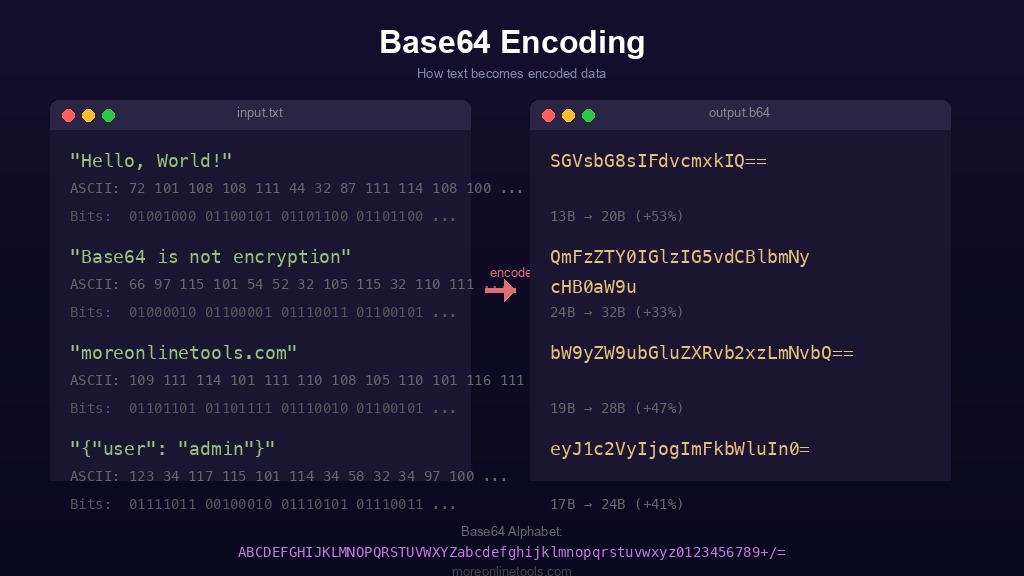
Base64 is a binary-to-text encoding scheme that converts binary data into a sequence of printable ASCII characters. The name "Base64" comes from the fact that it uses a set of 64 characters to represent data. These 64 characters consist of uppercase letters (A-Z), lowercase letters (a-z), digits (0-9), and two additional characters, typically + and /, with = used as a padding character.
Base64 was originally designed to allow binary data to be transmitted over channels that only reliably support text content. Think of it as a universal translator: it takes any sequence of bytes, whether that is an image, a document, or encrypted data, and turns it into a string of characters that can safely travel through text-based protocols like email (SMTP), HTML, CSS, JSON, and XML.
The encoding is defined in RFC 4648, which standardizes several Base encoding alphabets. The most common variant you will encounter on the web is the standard Base64 alphabet, but there is also a URL-safe variant that replaces + with - and / with _ to avoid conflicts with URL reserved characters.
How the Base64 Algorithm Works
Understanding the algorithm behind Base64 helps demystify what feels like a "magic" transformation. Here is the step-by-step process:
Step 1: Convert Input to Binary
Every byte of the input data is represented as an 8-bit binary number. For example, the ASCII text Man is represented as:
- M = 77 in decimal =
01001101in binary - a = 97 in decimal =
01100001in binary - n = 110 in decimal =
01101110in binary
Concatenated, this gives us a 24-bit stream: 010011010110000101101110
Step 2: Split into 6-Bit Groups
Instead of the usual 8-bit byte boundaries, Base64 splits the binary stream into groups of 6 bits. Why 6 bits? Because 26 = 64, which is exactly the number of characters in the Base64 alphabet. Our 24-bit stream becomes four 6-bit groups:
010011= 19010110= 22000101= 5101110= 46
Step 3: Map to the Base64 Character Table
Each 6-bit value (0-63) maps to a specific character in the Base64 alphabet:
| Value Range | Characters |
|---|---|
| 0-25 | A-Z |
| 26-51 | a-z |
| 52-61 | 0-9 |
| 62 | + |
| 63 | / |
Applying this to our values: 19 = T, 22 = W, 5 = F, 46 = u. So Man encodes to TWFu.
Step 4: Handling Padding
When the input length is not a multiple of 3 bytes, the binary stream does not divide evenly into 6-bit groups. In this case, zero bits are appended to complete the final 6-bit group, and = padding characters are added to the output to indicate how many extra bytes were added:
- 1 byte input produces 2 Base64 characters +
==padding - 2 bytes input produces 3 Base64 characters +
=padding - 3 bytes input produces 4 Base64 characters with no padding
For example, encoding just Ma (2 bytes) gives us TWE=, and encoding M alone (1 byte) gives us TQ==.
Common Use Cases for Base64 Encoding
Base64 encoding appears in many areas of modern web development and software engineering. Here are the most important ones:
1. Data URIs in HTML and CSS
Data URIs allow you to embed files directly in HTML or CSS using Base64 encoding. Instead of making a separate HTTP request for a small image, you can inline it:
<img src="data:image/png;base64,iVBORw0KGgoAAAANSUhEUgAAAAUA..." />This is particularly useful for small icons and decorative images where eliminating an HTTP request improves page load performance. However, Base64 increases the data size by approximately 33%, so this technique is best reserved for files under 2-3 KB. You can use our Image to Base64 converter to quickly generate data URIs from any image file.
2. Email Attachments (MIME)
The original and perhaps most historically significant use of Base64 is in email. The SMTP protocol was designed to transmit 7-bit ASCII text, which means binary files like images, PDFs, and documents cannot be sent directly. MIME (Multipurpose Internet Mail Extensions) uses Base64 to encode these attachments so they can be safely transmitted through email servers without corruption.
3. API Authentication Tokens
HTTP Basic Authentication encodes the username:password pair in Base64 and sends it in the Authorization header:
Authorization: Basic dXNlcm5hbWU6cGFzc3dvcmQ=This is a standard mechanism defined in RFC 7617. It is important to understand that this provides encoding, not encryption. Anyone who intercepts this header can trivially decode it, which is why Basic Authentication must always be used over HTTPS.
4. JSON Web Tokens (JWT)
JWTs are one of the most common uses of Base64 in modern web development. A JWT consists of three Base64URL-encoded parts separated by dots: the header, payload, and signature. For example:
eyJhbGciOiJIUzI1NiJ9.eyJ1c2VyIjoiam9obiJ9.xyz123...The header and payload are Base64URL-encoded JSON objects that can be decoded by anyone. The signature is what provides integrity verification. You can inspect and decode JWTs using our JWT Decoder tool or generate test tokens with the JWT Generator.
5. Storing Binary Data in JSON and XML
JSON and XML are text-based formats that do not natively support binary data. When you need to include binary content, such as a cryptographic key, a small image, or a certificate, Base64 encoding is the standard approach. Many APIs return binary data as Base64-encoded strings within JSON responses.
6. Encoding Data in URLs
While standard Base64 uses characters that are reserved in URLs (+, /, =), the URL-safe variant (Base64URL) replaces these with -, _, and optionally removes padding. This is used extensively in OAuth tokens, signed URLs, and state parameters. For other URL encoding needs, check out our URL Encoder/Decoder tool.
Base64 Is NOT Encryption
This is one of the most critical points to understand, and a mistake that even experienced developers sometimes make: Base64 encoding is not a security mechanism. It provides absolutely zero confidentiality.
Here is why this distinction matters:
- Encoding transforms data from one format to another for compatibility. It is fully reversible by anyone, with no key or secret required.
- Encryption transforms data to prevent unauthorized access. It requires a key to reverse and is designed to be computationally infeasible to break without that key.
If someone gives you a Base64 string, you can decode it instantly. There is no key, no password, no secret. Try it yourself with our Base64 Encoder/Decoder: paste any Base64 string and you will see the original data immediately.
Never store passwords, API keys, or sensitive data using only Base64 encoding. If you need actual encryption, use algorithms like AES-256. You can experiment with our AES Encryption tool to see the difference between encoding and encryption. For password hashing, consider using dedicated algorithms like bcrypt, scrypt, or Argon2.
The Size Overhead: Understanding the 33% Increase
Base64 encoding always increases the size of the data. The reason is mathematical: every 3 bytes (24 bits) of input become 4 characters (32 bits) of output. This means the encoded data is approximately 33% larger than the original.
Here is a quick reference for size overhead:
| Original Size | Base64 Size | Overhead |
|---|---|---|
| 1 KB | ~1.37 KB | +37% |
| 10 KB | ~13.3 KB | +33% |
| 100 KB | ~133 KB | +33% |
| 1 MB | ~1.33 MB | +33% |
This overhead is important to consider when embedding images as data URIs. A 50 KB image becomes approximately 67 KB when Base64-encoded, and that Base64 string is inlined directly in your HTML or CSS, making the document itself larger and potentially slower to parse.
When NOT to Use Base64
Knowing when to avoid Base64 is just as important as knowing when to use it. Here are common scenarios where Base64 is the wrong choice:
- Large files: Embedding a 500 KB image as a Base64 data URI increases the HTML document size by ~667 KB, destroys caching possibilities, and slows down page rendering. Serve large files as separate resources instead.
- Security: As discussed above, never use Base64 as a security measure. It is trivially reversible.
- Database storage: Storing large binary data as Base64 in a database column wastes 33% more storage space. Use native BLOB/BYTEA columns instead.
- Streaming data: Base64 requires the full input to be available before encoding (due to the 3-byte grouping). For streaming scenarios, chunked transfer encoding or binary protocols are better choices.
- Performance-critical paths: Base64 encoding and decoding require CPU cycles. In high-throughput systems processing millions of operations per second, the overhead can become significant.
Practical Examples with Code
Here are quick examples of Base64 encoding and decoding in popular programming languages:
JavaScript (Browser and Node.js)
// Encoding
const encoded = btoa("Hello, World!");
console.log(encoded); // "SGVsbG8sIFdvcmxkIQ=="

// Decoding
const decoded = atob("SGVsbG8sIFdvcmxkIQ==");
console.log(decoded); // "Hello, World!"

// For Unicode strings, use TextEncoder
const encoder = new TextEncoder();
const bytes = encoder.encode("Hello");
const base64 = btoa(String.fromCharCode(...bytes));
Python
import base64

# Encoding
encoded = base64.b64encode(b"Hello, World!")
print(encoded)  # b'SGVsbG8sIFdvcmxkIQ=='

# Decoding
decoded = base64.b64decode(encoded)
print(decoded)  # b'Hello, World!'

# URL-safe variant
url_safe = base64.urlsafe_b64encode(b"Hello, World!")
PHP
// Encoding
$encoded = base64_encode("Hello, World!");
echo $encoded; // "SGVsbG8sIFdvcmxkIQ=="

// Decoding
$decoded = base64_decode($encoded);
echo $decoded; // "Hello, World!"
Of course, you do not need to write code every time you need to encode or decode Base64. Our online Base64 tool handles it instantly in your browser with no software installation required.
Image to Base64 Conversion: Benefits and Drawbacks
Converting images to Base64 strings is one of the most debated uses of this encoding. Here is a balanced look at both sides:
Benefits
- Fewer HTTP requests: Each image embedded as a data URI eliminates one network round-trip. For pages with many small icons, this can measurably improve load times.
- Self-contained documents: An HTML file with Base64 images is completely standalone. This is useful for email templates, offline documents, and single-file exports.
- No CORS issues: Inline images bypass cross-origin restrictions entirely.
- Simplified deployment: No need to manage separate image files, CDN paths, or asset pipelines for small graphics.
Drawbacks
- 33% size increase: The encoded string is always larger than the original binary file.
- No browser caching: Inline Base64 images cannot be cached independently. Every page load transfers the full encoded string again.
- Blocking rendering: Base64 images in CSS must be downloaded and parsed as part of the stylesheet before the page can render.
- Maintenance difficulty: Updating an inline Base64 image requires regenerating and replacing the entire encoded string.
The general rule of thumb: use Base64 data URIs for images under 2 KB (small icons, simple SVGs, 1x1 tracking pixels). For anything larger, serve the image as a separate file and let the browser cache it. You can experiment with this using our Image to Base64 and Base64 to Image conversion tools.
Base64 Variants You Should Know
Not all Base64 encoding is the same. Here are the key variants:
- Standard Base64 (RFC 4648): Uses
A-Za-z0-9+/with=padding. This is the most common variant. - Base64URL (RFC 4648 Section 5): Uses
A-Za-z0-9-_instead of+/. Essential for URLs, filenames, and tokens. Used in JWTs. - MIME Base64 (RFC 2045): Same alphabet as standard but inserts line breaks every 76 characters. Used in email attachments.
- Base32: Uses a 32-character alphabet. Less space-efficient but case-insensitive, useful in contexts where case sensitivity is problematic (like TOTP secret keys).
Summary and Key Takeaways
Base64 encoding is a fundamental tool in every developer's toolkit. Here are the essential points to remember:
- Base64 converts binary data to text using a 64-character alphabet, producing output that is 33% larger than the input.
- It works by splitting binary data into 6-bit groups and mapping each group to a printable character.
- Common uses include data URIs, email attachments, JWT tokens, API authentication, and embedding binary data in JSON/XML.
- Base64 is encoding, not encryption. Never use it as a security measure.
- Use Base64 for small files and data transport. Avoid it for large files, security, and performance-critical paths.
- The URL-safe variant (Base64URL) replaces problematic characters for use in URLs and tokens.
Try Our Free Base64 Encoder
Encode and decode text or files to Base64 instantly in your browser. No data is sent to any server.